Turn an idea into a world built from pixels.
AI Pixel Art Generator
Create characters, monsters, icons, avatars, and game scenes with an AI Pixel Art Generator. Describe the subject or add a reference image, then shape the result with 8-bit or 16-bit detail, a limited palette, crisp outlines, and the composition you need.
- 8-bit and 16-bit-style examples
- Create from text or a reference image
- Free trial credits with registration
 Create Pixel Art
AI PIXEL ART GENERATOR GALLERY
Pixel art examples for characters, worlds, and game assets
Explore 16 results covering heroes, monsters, inventory icons, avatars, cities, interiors, and fantasy environments. Open any card to see its pixel art prompt and load the idea into the AI Pixel Art Generator.
Turn photos and illustrations into pixel art
Use the image mode in the AI Pixel Art Generator to preserve a subject, pose, or composition while rebuilding the image with crisp pixels, a limited palette, and a new background.
Cat photo to 16-bit-style avatar
The AI Pixel Art Generator keeps the head angle, ears, orange-and-white markings, and amber eyes while simplifying the fur into square pixels and a compact palette.
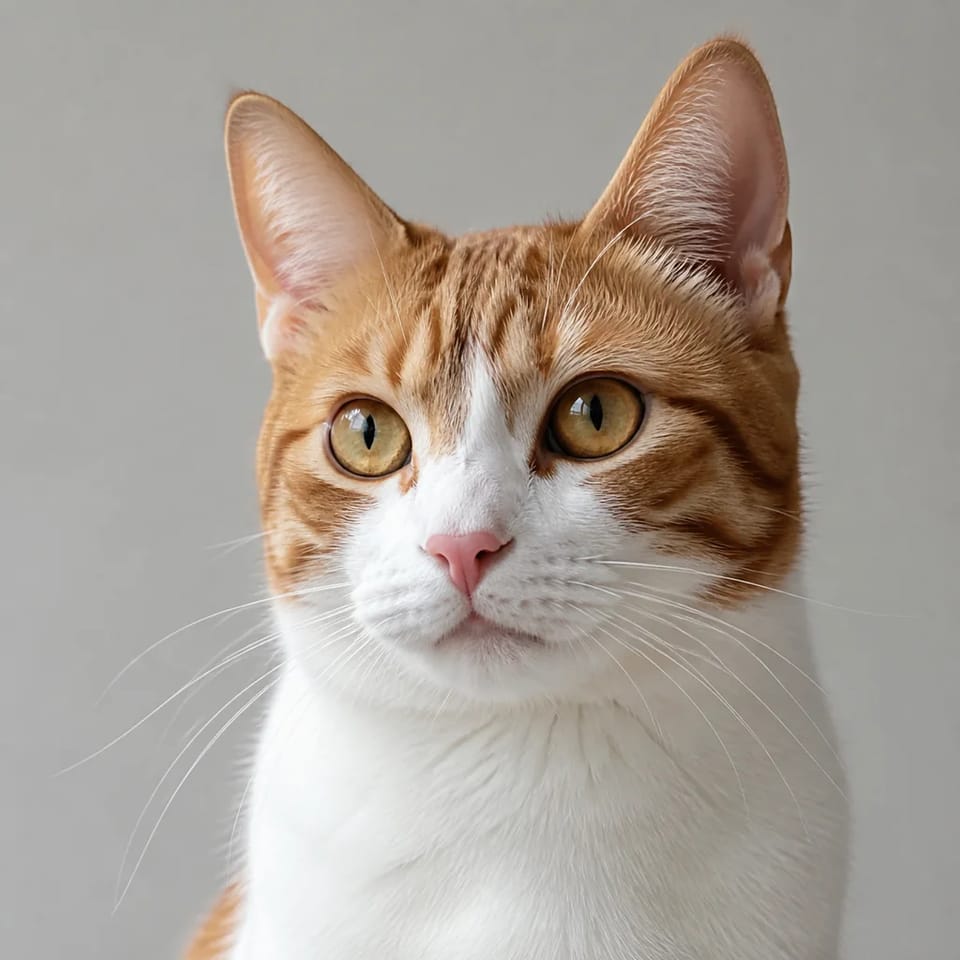 Reference photo
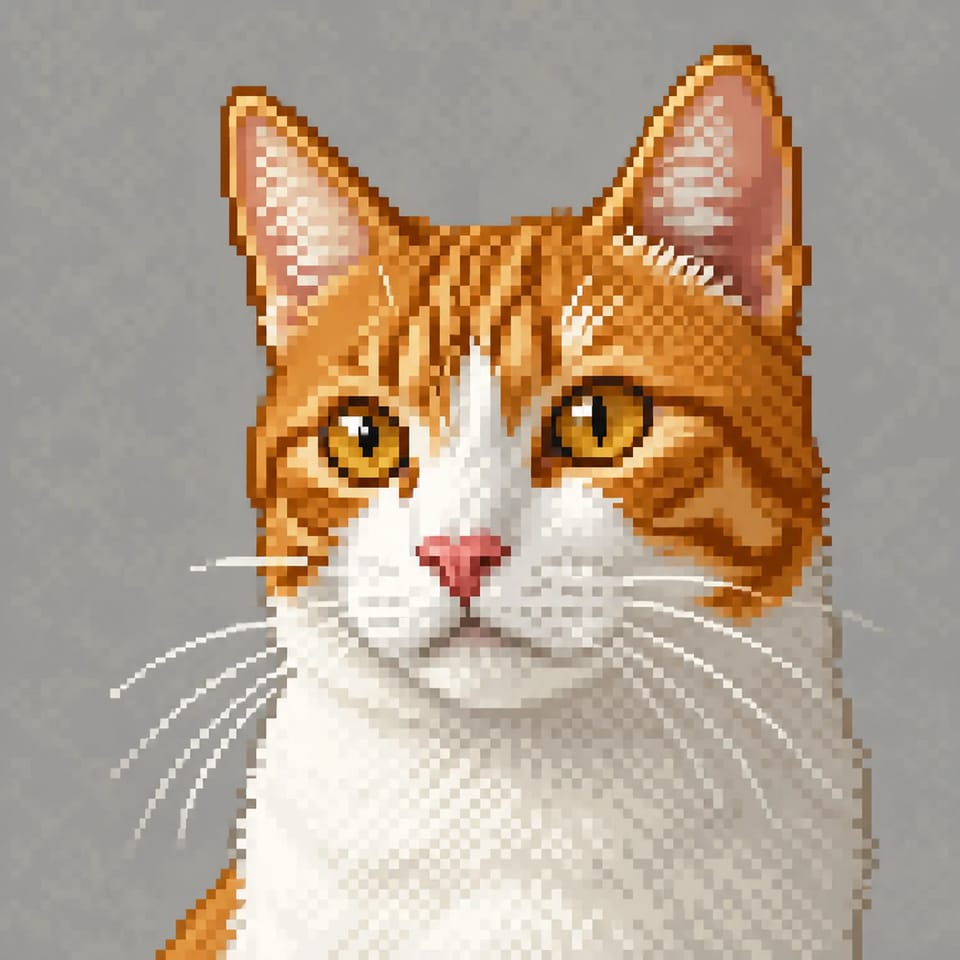 16-bit-style pixel art
Cat photo to 16-bit-style avatar
The AI Pixel Art Generator keeps the head angle, ears, orange-and-white markings, and amber eyes while simplifying the fur into square pixels and a compact palette.
Reference photo16-bit-style pixel artKeep this cat's head angle, ears, orange and white markings, amber eyes, and calm expression. Transform it into a 16-bit-style pixel art avatar with hard outlines, about 20 colors, square pixels, and subtle dithering. Use a simple light gray background. No text or logo.
PIXEL ART PROMPT RECIPE
Control the same subject with a better pixel art prompt
A useful AI Pixel Art Generator prompt goes beyond the subject. Define pixel detail, palette, outline, composition, lighting, and exclusions so the result matches the visual language of your project.
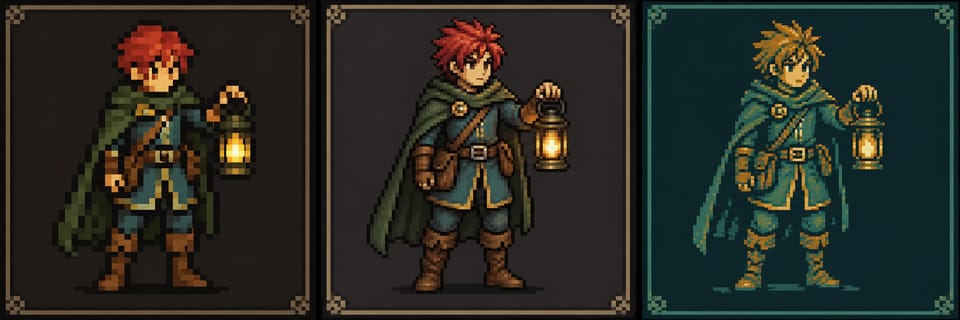
The AI Pixel Art Generator keeps the character, pose, and lantern consistent while changing coarse 8-bit pixels, detailed 16-bit pixels, and a teal-and-amber limited palette.
Six parts of a pixel art prompt
Subject
Red-haired adventurer
Name one subject, role, outfit, and important prop.
Pixel detail
8-bit / 16-bit style
Set the direction for chunkier or more detailed pixels.
Palette
12 colors, teal and amber
State both the color count and dominant hues.
Outline
Hard, crisp outline
Ask for square pixels and a readable silhouette.
Composition
Full body, centered, square
Fix the subject size, framing, and camera angle.
Exclusions
No text or smooth lines
Remove blur, logos, gradients, and unwanted realism.
Short prompt
Make pixel art of a red-haired adventurer.
Structured prompt
A red-haired adult adventurer standing with a small lantern, full body visible and centered. 16-bit-style pixel art, about 24 colors, limited teal and amber palette, hard outlines, square pixels, and subtle dithering. No text, logo, watermark, or smooth outlines.
Load an example into the AI Pixel Art Generator, then replace the subject, palette, and setting to build a focused prompt quickly.
What you can create with an AI Pixel Art Generator
From tiny icons to atmospheric worlds, begin with the job the image must perform. The AI Pixel Art Generator becomes easier to direct when pixel detail, palette, and composition support that purpose.
Game character concepts
Use the AI Pixel Art Generator to explore a character's role, outfit, silhouette, and signature equipment.
Monsters and game icons
Use the AI Pixel Art Generator with chunky pixels and fewer colors for monsters, props, and icons that remain readable at a glance.
Backgrounds and worlds
Use the AI Pixel Art Generator to build forests, cities, interiors, and vehicles with a defined time of day, viewpoint, and palette.
Avatars and creator assets
Use the AI Pixel Art Generator to preserve recognizable features from people or pets in compact retro profile art.
Four controls for more convincing pixel art
Tell the AI Pixel Art Generator what to draw and how the pixels should behave: detail level, palette, outline, light, and composition. For broader painted styles, explore the AI Illustration Generator; for realistic images, use the AI Photo Generator.
Choose 8-bit or 16-bit detail
Use the AI Pixel Art Generator for chunkier pixels and fewer colors, or for finer clothing, lighting, and environmental detail.
Unify the image with a limited palette
Tell the AI Pixel Art Generator the dominant hues and approximate color count so the subject and background feel designed together.
Ask for hard outlines and square pixels
Ask the AI Pixel Art Generator for crisp edges, readable shapes, and no anti-aliasing to strengthen the deliberate pixel-art look.
Separate what to keep from what to change
In the AI Pixel Art Generator image mode, identify the features to preserve and the background, palette, or rendering style to replace.
How to use the AI Pixel Art Generator
Start with a nearby example, replace the subject with your idea, then refine one visual decision at a time. The AI Pixel Art Generator supports both text to pixel art and reference-image workflows.
Describe one subject and scene
Enter the main character, creature, item, or place, or load a prompt from the gallery as a starting point.
Set pixel detail and palette
Add 8-bit or 16-bit style, color count, outline, light, aspect ratio, and an optional reference image.
Sign in and generate
Review the selected model, aspect ratio, and displayed credit cost before running the AI Pixel Art Generator.
Refine and download
Compare the outline and palette, revise the prompt where needed, regenerate, and save the result you prefer.
Try the AI Pixel Art Generator with free credits
New accounts receive trial credits for the AI Pixel Art Generator. Sign-in is required to generate; current models, credit costs, and ongoing access are shown in the generator and on the pricing page.
Begin from a proven example
Change the subject in a gallery prompt, then review the live credit cost and your balance before generating.
Review publishing and commercial terms
Before publishing or selling an AI Pixel Art Generator result, review the plan terms, Terms of Service, reference-image rights, and any third-party rights.
Ideas become visible in the AI Pixel Art Generator
From early game concepts to profile icons and story locations, the AI Pixel Art Generator helps creators compare visual directions before committing to one.
“I used the AI Pixel Art Generator for a forest courier and several monsters. Comparing palette size and outlines made the world feel much more coherent.”
Ethan Brooks
Indie Game Developer
“Turning my cat photo into a retro profile icon was straightforward. I liked that I could specify which markings and eye color the AI Pixel Art Generator should keep.”
Maya Chen
Social Media Creator
“A robot noodle stall existed only in my notes. Seeing it as one detailed scene helped me imagine where the characters would meet and talk.”
Liam Carter
Narrative Game Writer
“The gallery gave me a practical pixel art prompt to start from. I tested the same subject in 8-bit and 16-bit styles and immediately saw which direction fit.”
Sofia Reed
Illustration Hobbyist
“I specified teal and violet across props, avatars, and backgrounds. The AI Pixel Art Generator made it easier to keep the whole creator pack visually connected.”
Noah Bennett
Streaming Asset Designer
“Reducing flowers and animals to fewer colors gave me cleaner silhouettes to explore for pattern ideas. The limited-palette prompts were especially useful.”
Chloe Martin
Craft Pattern Maker
“I used the AI Pixel Art Generator for a forest courier and several monsters. Comparing palette size and outlines made the world feel much more coherent.”
Ethan Brooks
Indie Game Developer
“Turning my cat photo into a retro profile icon was straightforward. I liked that I could specify which markings and eye color the AI Pixel Art Generator should keep.”
Maya Chen
Social Media Creator
“A robot noodle stall existed only in my notes. Seeing it as one detailed scene helped me imagine where the characters would meet and talk.”
Liam Carter
Narrative Game Writer
“The gallery gave me a practical pixel art prompt to start from. I tested the same subject in 8-bit and 16-bit styles and immediately saw which direction fit.”
Sofia Reed
Illustration Hobbyist
“I specified teal and violet across props, avatars, and backgrounds. The AI Pixel Art Generator made it easier to keep the whole creator pack visually connected.”
Noah Bennett
Streaming Asset Designer
“Reducing flowers and animals to fewer colors gave me cleaner silhouettes to explore for pattern ideas. The limited-palette prompts were especially useful.”
Chloe Martin
Craft Pattern Maker
“I used the AI Pixel Art Generator for a forest courier and several monsters. Comparing palette size and outlines made the world feel much more coherent.”
Ethan Brooks
Indie Game Developer
“Turning my cat photo into a retro profile icon was straightforward. I liked that I could specify which markings and eye color the AI Pixel Art Generator should keep.”
Maya Chen
Social Media Creator
“A robot noodle stall existed only in my notes. Seeing it as one detailed scene helped me imagine where the characters would meet and talk.”
Liam Carter
Narrative Game Writer
“The gallery gave me a practical pixel art prompt to start from. I tested the same subject in 8-bit and 16-bit styles and immediately saw which direction fit.”
Sofia Reed
Illustration Hobbyist
“I specified teal and violet across props, avatars, and backgrounds. The AI Pixel Art Generator made it easier to keep the whole creator pack visually connected.”
Noah Bennett
Streaming Asset Designer
“Reducing flowers and animals to fewer colors gave me cleaner silhouettes to explore for pattern ideas. The limited-palette prompts were especially useful.”
Chloe Martin
Craft Pattern Maker
“I used the AI Pixel Art Generator for a forest courier and several monsters. Comparing palette size and outlines made the world feel much more coherent.”
Ethan Brooks
Indie Game Developer
“Turning my cat photo into a retro profile icon was straightforward. I liked that I could specify which markings and eye color the AI Pixel Art Generator should keep.”
Maya Chen
Social Media Creator
“A robot noodle stall existed only in my notes. Seeing it as one detailed scene helped me imagine where the characters would meet and talk.”
Liam Carter
Narrative Game Writer
“The gallery gave me a practical pixel art prompt to start from. I tested the same subject in 8-bit and 16-bit styles and immediately saw which direction fit.”
Sofia Reed
Illustration Hobbyist
“I specified teal and violet across props, avatars, and backgrounds. The AI Pixel Art Generator made it easier to keep the whole creator pack visually connected.”
Noah Bennett
Streaming Asset Designer
“Reducing flowers and animals to fewer colors gave me cleaner silhouettes to explore for pattern ideas. The limited-palette prompts were especially useful.”
Chloe Martin
Craft Pattern Maker
AI Pixel Art Generator FAQ
Learn how the AI Pixel Art Generator handles free trial credits, text and image inputs, 8-bit and 16-bit styles, prompt structure, approximate 32x32 aesthetics, and commercial-plan terms.
An AI Pixel Art Generator is an online tool that turns a written description or reference image into pixel-art-style artwork. You can describe the subject, pixel detail, palette, outline, composition, and background, or begin from one of the included prompts.
New accounts receive free trial credits. Sign in to generate, then review the current model cost shown directly in the AI Pixel Art Generator before submitting a request.
Describe a focused subject and scene, then add 8-bit or 16-bit style, an approximate color count, hard outlines, composition, and lighting. A structured pixel art prompt gives the AI Pixel Art Generator clearer visual constraints.
Choose an 8-bit-style direction for chunkier pixels, fewer colors, and simpler silhouettes. Choose 16-bit-style detail when clothing, props, lighting, and backgrounds need more visual information.
Yes. Switch the AI Pixel Art Generator to image mode and upload a reference. State which features, pose, or composition should remain, then describe the pixel detail, palette, and background you want to change.
You can request a 32x32-style icon with simple shapes and a small palette. The tool does not lock the final file to a strict 32x32 grid, so resize the result and inspect the outline before using it at that scale.
The current AI Pixel Art Generator is designed for single images and visual concepts. It does not guarantee matching up, down, left, and right views, walk cycles, or a regular sprite-sheet grid.
Commercial use depends on the active plan. Free-plan results are not licensed for commercial use. Review the pricing page, Terms of Service, reference-image permissions, and third-party rights before publishing or selling a result.
Yes. The gallery demonstrates inventory icons, monsters, character concepts, interiors, landscapes, vehicles, profile avatars, and creator assets. Match the prompt and aspect ratio to the asset you need.
Use this order: subject, 8-bit or 16-bit detail, color count and palette, outline, composition, lighting, background, and exclusions. Open a gallery card to copy a complete prompt and replace the subject with your own idea.
Build your pixel world with the AI Pixel Art Generator
Choose a character, monster, icon, or environment from the gallery, replace the subject and palette with your idea, and begin with free trial credits after registration.