15 free prompts with finished examples
AI Illustration Prompts Find the look you want, then make it yours.
Browse anime, watercolor, storybook, flat, line-art, retro, and pixel-art examples. Copy an AI illustration prompt or load it directly into the generator.
- Copy any prompt
- Filter by style and use
- Open it in the generator
PROMPT LIBRARY
Choose an AI Illustration Prompt by Example
Browse AI illustration prompt examples close to the result you want instead of writing everything from scratch. Keep the structure, then replace the subject, colors, and setting with your own ideas.
Character · Half Body
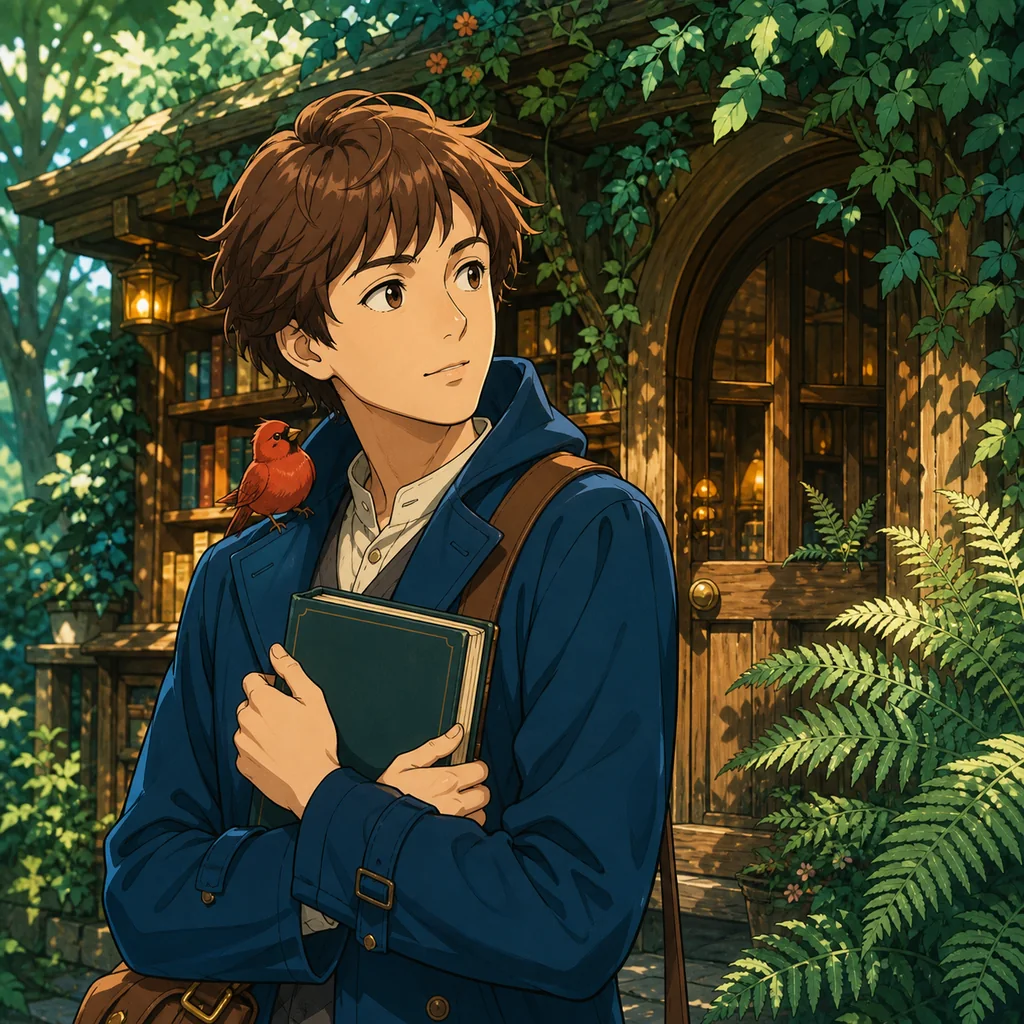
Story-Driven Anime Character
This prompt defines the character, prop, gaze, and background placement so the result reads like a coherent moment from a larger story.
AI illustration prompt
An adult traveler with short chestnut hair wears a deep blue coat and a brown shoulder satchel, holding a book outside a small forest bookshop. A red bird perches on their shoulder. Waist-up composition at eye level, subject slightly left of center, wooden door and fern leaves in the right background. Original anime-style illustration, clean delicate linework, crisp cel shading, teal and amber palette, curious expression. Avoid photorealism. No text or logos.
PROMPT FORMULA
Build Better AI Illustration Prompts with 6 Clear Parts
Learning how to write AI illustration prompts does not mean inventing one long sentence. Give the model visual decisions in a useful order: choose one subject, then add appearance, style, composition, color, and background. This structure also makes revisions easier.
A practical prompt order
Subject
A traveler and a red bird
Choose the one person, object, or place that should hold the viewer’s attention.
Appearance & Action
Blue coat, holding a book
Add clothing, expression, pose, and important props in short, concrete phrases.
Style & Medium
Transparent watercolor, white paper
Name the line quality, painting method, material, and surface texture you want.
Composition
Waist-up, eye level
Define camera distance, viewpoint, open space, and where the subject sits in the frame.
Color & Light
Teal and amber, soft light
Connect colors to subjects, backgrounds, accents, and the time or direction of light.
Setting & Exclusions
Forest bookshop, no text
Set the location, then briefly remove unwanted text, logos, objects, or rendering styles.
Too vague
Paint a cute traveler in watercolor
Structured AI illustration prompt
An adult traveler with short chestnut hair wears a blue coat and holds a book to their chest. A red bird perches on their shoulder. Waist-up at eye level. Transparent watercolor with soft blooms and visible white paper. Teal and amber palette. A small forest bookshop in the background. No text or logos.
You do not need to specify every detail at once. Review the first result, then add or replace one element at a time so you can tell which part of the AI illustration prompt produced the change.
Choose AI Illustration Prompts by Intended Use
Deciding where the finished image will appear helps determine its framing and empty space. Keep the template’s visual logic while replacing the subject for your project.
Social Avatars & Characters
Use a square frame, large face or silhouette, and limited palette so the character remains distinctive at small sizes.
Storybook Illustrations
Describe the character, place, props, and light as one scene to create a warm image that suggests what happens before and after.
Blogs & Editorial Content
Reserve space for a heading and choose a square or wide ratio with a controlled palette that makes the article topic clear at a glance.
Game Backgrounds & Worlds
Organize foreground, middle ground, distance, the main light source, time of day, and key architecture into one explorable setting.
Turn Vague Adjectives into Visual Decisions
Words such as “beautiful” or “cute” do not explain whether you want different lines, colors, or framing. These six habits keep AI illustration prompts concise while making the desired result more specific.
Start with One Focal Subject
Avoid giving equal weight to too many people, animals, and buildings. Choose the main subject first, then state where supporting elements sit around it.
Pair Linework with Coloring
Combinations such as “fine ink lines with transparent watercolor” or “bold outlines with cel shading” define a style more clearly than one medium name.
Match Framing to the Use
Make faces large for avatars, include head to toe for character sheets, or preserve headline space for editorial images. Work backward from placement.
Attach Colors to Objects
Write “teal forest, amber windows, red bird” instead of listing color names alone. Each color then has a clear job in the composition.
Change One Element at a Time
After each result, pick the expression, background, palette, or composition as the next variable. Isolated changes reveal which instruction helped.
Keep Exclusions Short
Name only concrete unwanted elements such as text, logos, extra people, or photorealistic texture. Avoid long lists of generic negative terms.
HOW TO USE
How to Use AI Illustration Prompts
Choose an example and replace only the parts you need. Loading a template does not generate immediately, so you can review the wording, model, aspect ratio, and displayed credit cost first.
Filter the library by characters, watercolor, storybooks, design, line art, or backgrounds, then choose the example closest to your intended result.
Edit the people, objects, palette, and location in the prompt. Keeping its style and composition preserves the example’s visual direction.
Select “Create with this prompt” to load the wording and aspect ratio. Before generating, review the model, format, and displayed credit cost.
Review the first image and choose the single detail that matters most. Adjusting only the expression, color, or background makes iterations easier to compare.
How Creators Start from Visual Examples
Starting from a visible result makes it easier to turn an idea into specific words instead of trying to invent a complete prompt from a blank page.
“I start with the full-body example and replace only the clothing and expression. The framing and simple background give me a consistent base for comparing character directions.”
Maya Carter
Character Designer
“Seeing the finished image before choosing a prompt helps a lot. I keep the mascot’s bold outline and limited palette, then swap in a motif that fits each campaign.”
Jordan Lee
Social Content Creator
“The examples make the difference between watercolor and gouache easy to understand. I can replace the character and place while keeping a consistent storybook texture.”
Olivia Bennett
Children’s Book Creator
“I use the flat illustration templates as a guide for palette and open space. Changing the subject is enough to explore several article-header directions without losing the tone.”
Ethan Brooks
Editorial Designer
“The breakfast example shows how specific to be about dishes, flowers, fabric, and color. It helps me build a scene without crowding every part of the frame.”
Sophia Miller
Lifestyle Blogger
“The background prompts break a world into foreground, middle ground, distance, and light. That structure is useful when I compare pixel-art and storybook treatments.”
Noah Wilson
Indie Game Developer
“I start with the full-body example and replace only the clothing and expression. The framing and simple background give me a consistent base for comparing character directions.”
Maya Carter
Character Designer
“Seeing the finished image before choosing a prompt helps a lot. I keep the mascot’s bold outline and limited palette, then swap in a motif that fits each campaign.”
Jordan Lee
Social Content Creator
“The examples make the difference between watercolor and gouache easy to understand. I can replace the character and place while keeping a consistent storybook texture.”
Olivia Bennett
Children’s Book Creator
“I use the flat illustration templates as a guide for palette and open space. Changing the subject is enough to explore several article-header directions without losing the tone.”
Ethan Brooks
Editorial Designer
“The breakfast example shows how specific to be about dishes, flowers, fabric, and color. It helps me build a scene without crowding every part of the frame.”
Sophia Miller
Lifestyle Blogger
“The background prompts break a world into foreground, middle ground, distance, and light. That structure is useful when I compare pixel-art and storybook treatments.”
Noah Wilson
Indie Game Developer
“I start with the full-body example and replace only the clothing and expression. The framing and simple background give me a consistent base for comparing character directions.”
Maya Carter
Character Designer
“Seeing the finished image before choosing a prompt helps a lot. I keep the mascot’s bold outline and limited palette, then swap in a motif that fits each campaign.”
Jordan Lee
Social Content Creator
“The examples make the difference between watercolor and gouache easy to understand. I can replace the character and place while keeping a consistent storybook texture.”
Olivia Bennett
Children’s Book Creator
“I use the flat illustration templates as a guide for palette and open space. Changing the subject is enough to explore several article-header directions without losing the tone.”
Ethan Brooks
Editorial Designer
“The breakfast example shows how specific to be about dishes, flowers, fabric, and color. It helps me build a scene without crowding every part of the frame.”
Sophia Miller
Lifestyle Blogger
“The background prompts break a world into foreground, middle ground, distance, and light. That structure is useful when I compare pixel-art and storybook treatments.”
Noah Wilson
Indie Game Developer
“I start with the full-body example and replace only the clothing and expression. The framing and simple background give me a consistent base for comparing character directions.”
Maya Carter
Character Designer
“Seeing the finished image before choosing a prompt helps a lot. I keep the mascot’s bold outline and limited palette, then swap in a motif that fits each campaign.”
Jordan Lee
Social Content Creator
“The examples make the difference between watercolor and gouache easy to understand. I can replace the character and place while keeping a consistent storybook texture.”
Olivia Bennett
Children’s Book Creator
“I use the flat illustration templates as a guide for palette and open space. Changing the subject is enough to explore several article-header directions without losing the tone.”
Ethan Brooks
Editorial Designer
“The breakfast example shows how specific to be about dishes, flowers, fabric, and color. It helps me build a scene without crowding every part of the frame.”
Sophia Miller
Lifestyle Blogger
“The background prompts break a world into foreground, middle ground, distance, and light. That structure is useful when I compare pixel-art and storybook treatments.”
Noah Wilson
Indie Game Developer
Frequently Asked Questions About AI Illustration Prompts
Learn how to write, copy, adapt, and test a prompt. When you are ready, continue in the AI Illustration Generator.
It is a written description that tells an image model what to draw and how to draw it. Combining the subject with appearance, style, composition, color, and background communicates a more specific visual goal. This page pairs each prompt with a finished example.
Yes. Use “Copy prompt” to copy the complete text. For a more original result, replace the person, object, location, and palette. “Create with this prompt” also loads the text and aspect ratio into the generator.
No special syntax is required for these templates. Clear, concrete visual language is more useful than a string of technical tokens. Different models interpret details differently, so start with the core scene and refine only the parts that need attention.
Choose the example closest to your goal, replace its subject and colors, then review the model and aspect ratio before generating. After the first result, revise only one variable—such as expression, composition, or background—so the effect of each change remains clear.
Replace broad adjectives such as “cute” or “beautiful” with visual decisions: line weight, coloring method, camera distance, empty space, object-specific colors, and lighting. Keep the first version focused, then add detail based on the result.
Not every image needs a long negative prompt. Start by naming only concrete elements you want to avoid, such as text, logos, extra people, or photorealistic texture. Available fields and interpretation vary by model.
Not necessarily. Details can change with the selected model, aspect ratio, settings, and generation run. Treat each example as a reference for style and composition, and state any features you need to preserve directly in the prompt.
Browsing and copying the templates is free. New Mireka accounts receive trial credits that can be used to start generating. Credit requirements depend on the selected model and settings, so review the displayed cost and current pricing before generation.
Turn a Prompt You Like into an Illustration of Your Own.
Load an AI illustration prompt from the examples, then replace the character, colors, and background with your own ideas. New accounts can start with trial credits.