 ChatGPT
 Perplexity
 Gemini
 Claude
What can you make from a single front-facing product photo if you let AI plan the layouts and write the prompts?
In this case study, we started with one bottle of yuzu soda and created five images in about five minutes: a clean product reference and four ecommerce images covering ingredients, serving, everyday use and packaging details. The image generation used five credits, with a recorded effective cost of less than US$0.03.
The project was made for the Japanese market. We have kept the original Japanese packaging and generated artwork, and explain the copy in English below. These are the original case-study results, not newly generated English versions.
The result: one reference plus four listing images
The four finished images do more than put the same bottle on different backgrounds. Each answers a different question a buyer might have.
| Image | Its job in the set |
|---|---|
| Clean white-background reference | Establish the bottle's appearance for later generations |
| Ingredient and origin image | Introduce the yuzu and its stated origin |
| Serving image | Communicate the juice content and a chilled serving idea |
| Dining scene | Show how the drink could fit into an everyday meal |
| Packaging details | Draw attention to the cap, glass, bubbles and label |
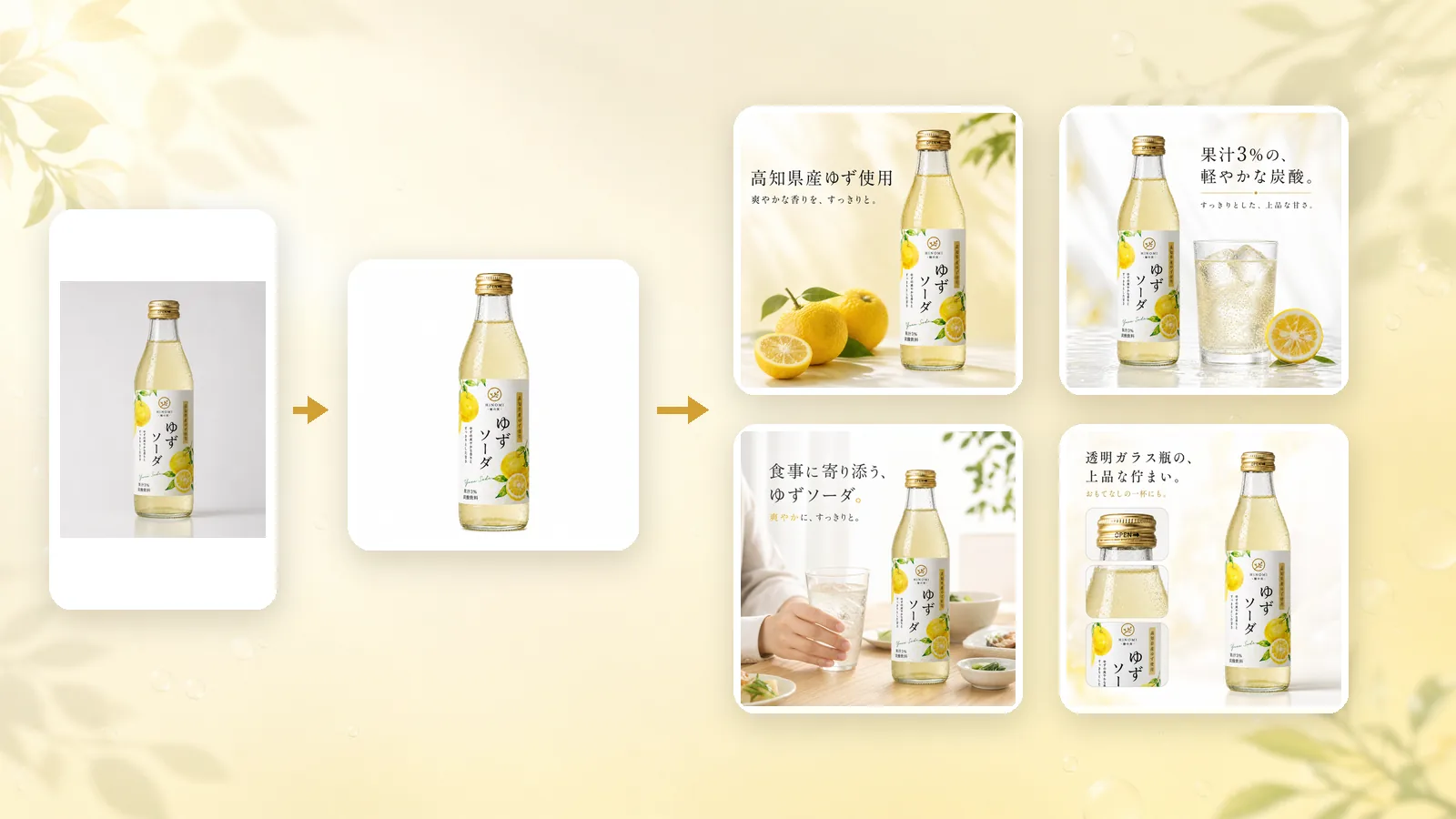
AI handled the written brief, image plan and individual prompts. We supplied the photo and reviewed the proposed facts and images. The practical benefit was being able to move from one product photo to a coordinated gallery without designing each layout manually.
The recorded setup, time and cost
| Item | What this case used |
|---|---|
| Case date | July 29, 2026 |
| Starting material | One front-facing photo of the yuzu soda bottle |
| Planning assistant | GPT-5.6 Sol |
| Image tool | Mireka, using Image to Image |
| Image model | GPT Image 2 |
| Settings | 1:1 aspect ratio, 1K resolution |
| Generations | Five: one clean reference and four ecommerce images |
| Time from source photo to finished images | About five minutes |
| Credits used | Five credits in total |
| Recorded effective cost | Less than US$0.03 |
These are the recorded conditions of the July 29 project. They describe this run rather than a fixed turnaround time or current per-image price. The generation screen shows the credit cost for the model and settings you choose today.
The source photo and product facts
We used only this front-facing photo as the starting reference:
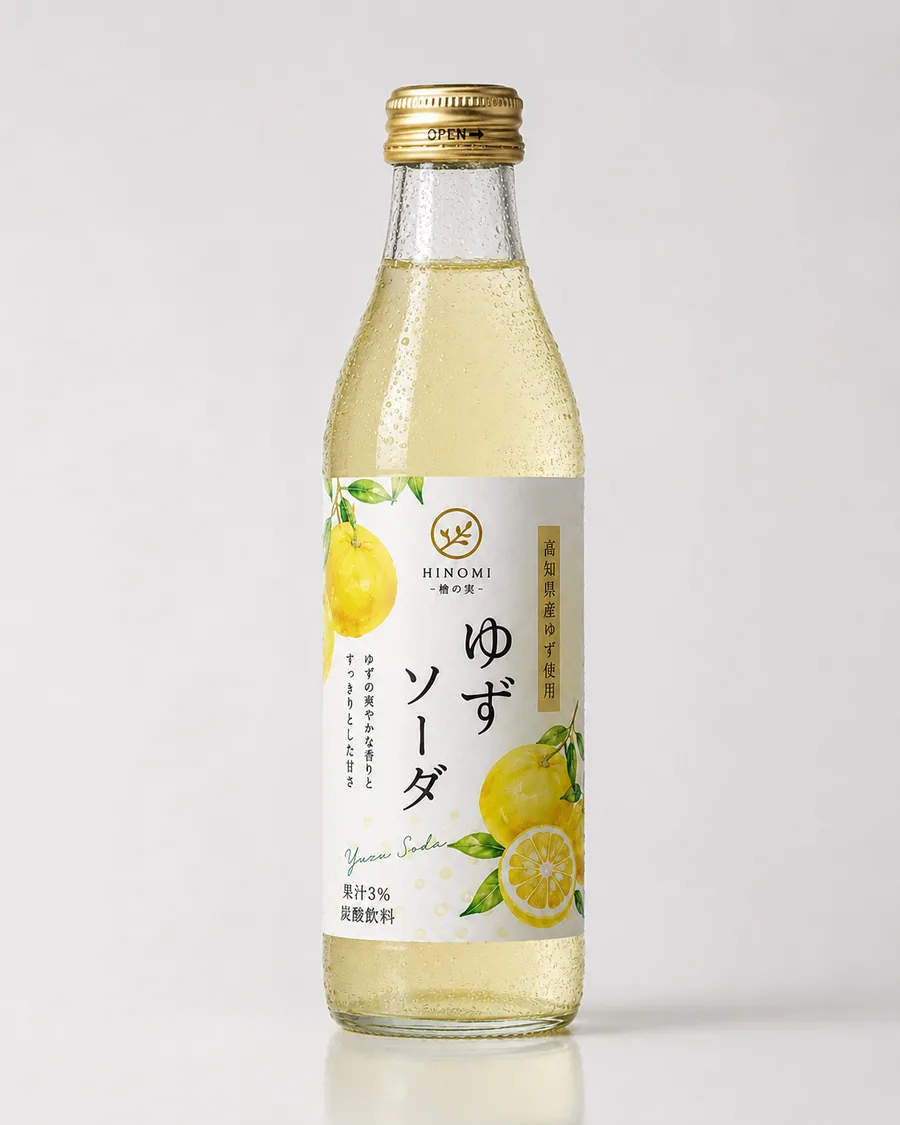
The visible product has a slim clear-glass bottle, a gold screw cap, pale yellow liquid with fine bubbles, and a vertical white label with yuzu artwork. Those details establish its identity and need to remain consistent.
The label also provides specific facts:
| Japanese label text | English meaning | How it informed the image plan |
|---|---|---|
| 高知県産ゆず使用 | Made with yuzu from Kochi Prefecture | An ingredient-and-origin image |
| 果汁3% | 3% juice | A serving image with the verified percentage |
| 炭酸飲料 | Carbonated soft drink | Bubbles, a glass and a chilled serving scene |
The photo did not establish every specification. We did not invent the bottle's capacity, retail price, awards or certifications to fill the gaps. The planning assistant used visible packaging information and kept the creative direction separate from product facts.
First, make a clean product reference
We generated a square image with the complete bottle on a white background. The purpose was to simplify the scene while preserving the silhouette, cap, label and liquid color.
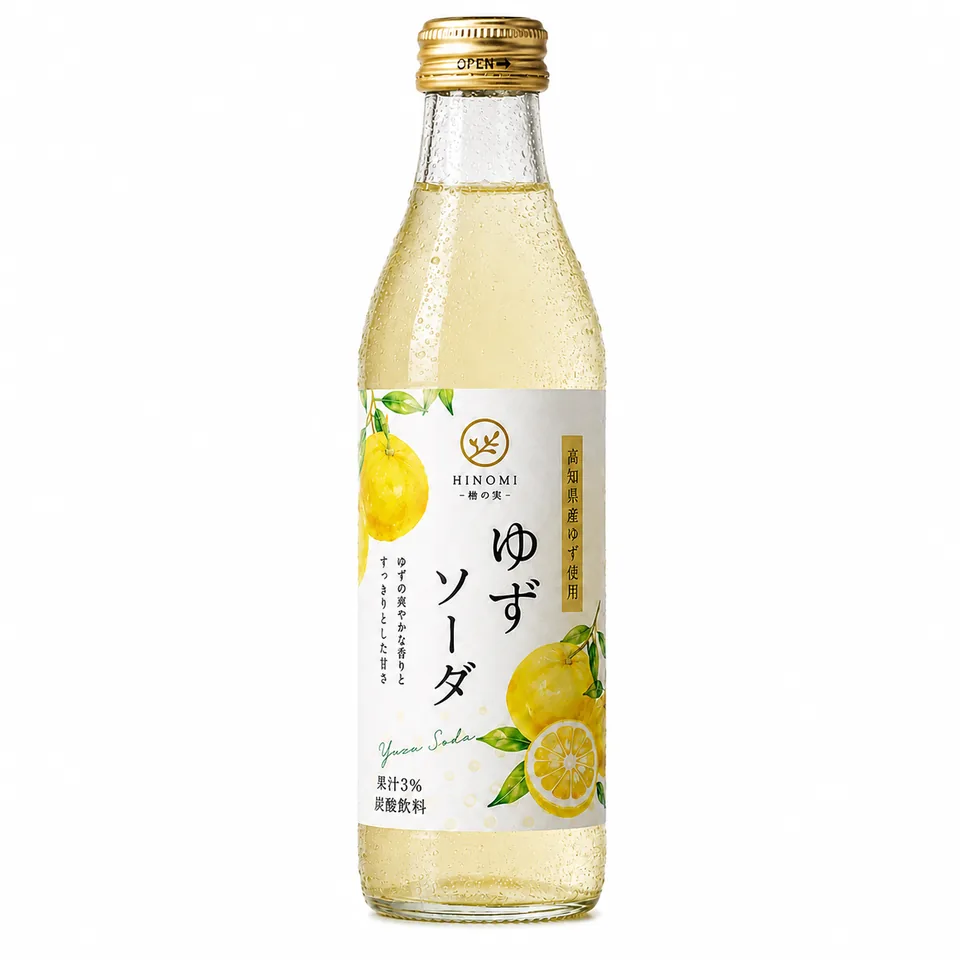
This approved reference was reused for the four later images. A shared reference gives every new composition the same starting point, rather than letting each prompt reinterpret what the product looks like.
Before continuing, we checked the bottle proportions, neck, cap, label position and legibility. A clean background is useful only if the item still matches the original.
Four finished images, four different purposes
Image 1: Introduce the yuzu and its origin
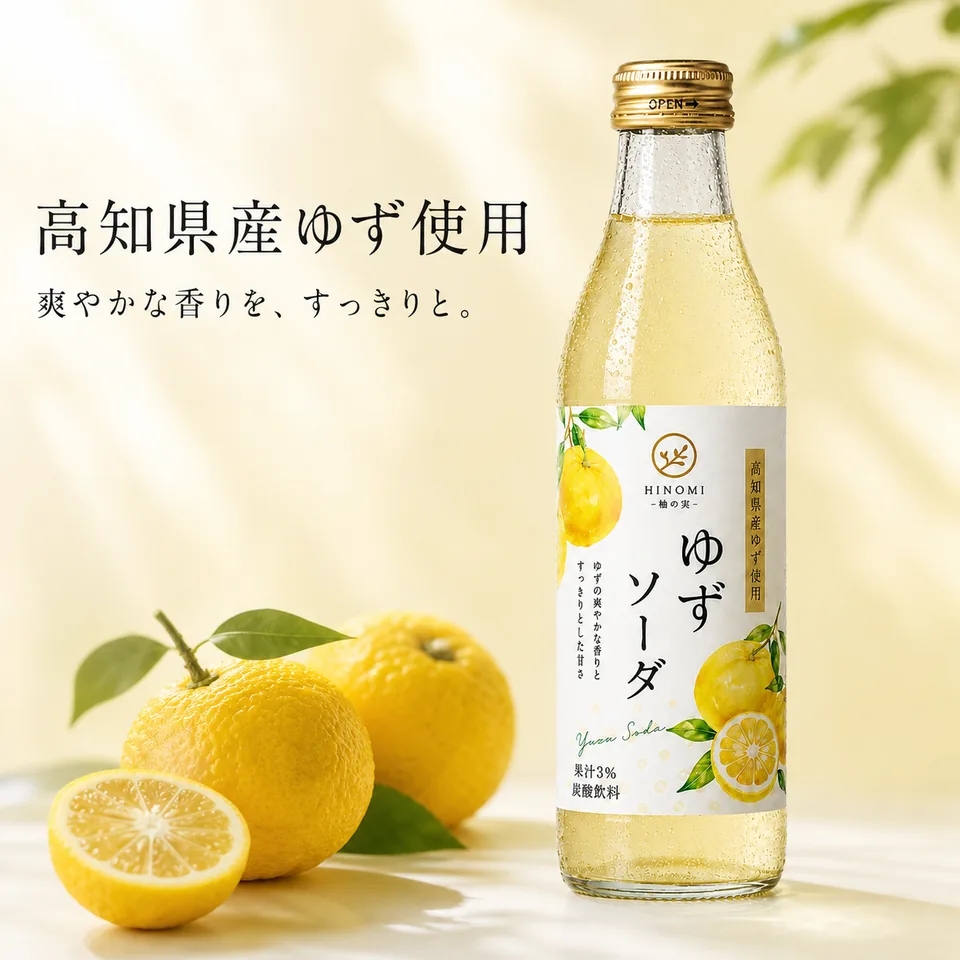
The bottle sits on the right, balanced by whole and sliced yuzu and leaves on the left. A pale yellow palette and soft light connect the scene to the citrus ingredient.
The main Japanese message draws on the label's “Made with yuzu from Kochi Prefecture” claim. The composition makes that information easier to notice without relying only on small packaging text.
AI planned: placement of the bottle and fruit, background color, lighting, visual hierarchy and the location of the headline.
Useful placement: a secondary listing image, product-story section or campaign graphic where ingredient context is relevant.
Review before use: the origin wording must match the actual product, the yuzu illustration should not obscure the label, and decorative fruit should not suggest an included bundle.
Image 2: Show the juice content and a serving idea
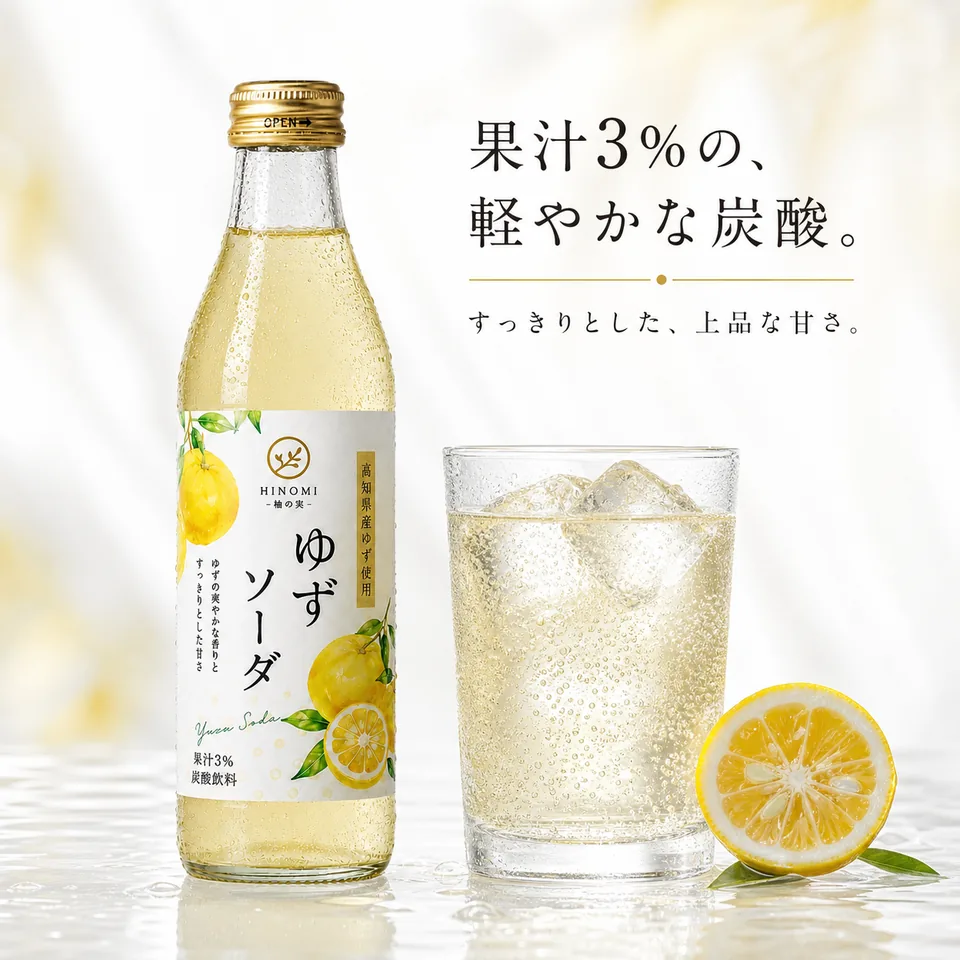
This composition pairs the bottle with an iced glass and citrus accents. The 3% juice message comes from the visible label, while the glass communicates a chilled serving suggestion.
Its job is different from the first image. The ingredient image explains what the drink is made with; this one helps the buyer imagine the drink being poured and enjoyed.
AI planned: the relationship between bottle and glass, condensation, bubbles, light and short supporting copy.
Useful placement: a gallery image explaining the drink or an approved seasonal promotional asset.
Review before use: check the percentage, liquid color, bottle-to-glass scale and any wording about flavor or refreshment. The glass, ice and fruit are scene props, not items included with the bottle.
Image 3: Put the drink in an everyday dining scene
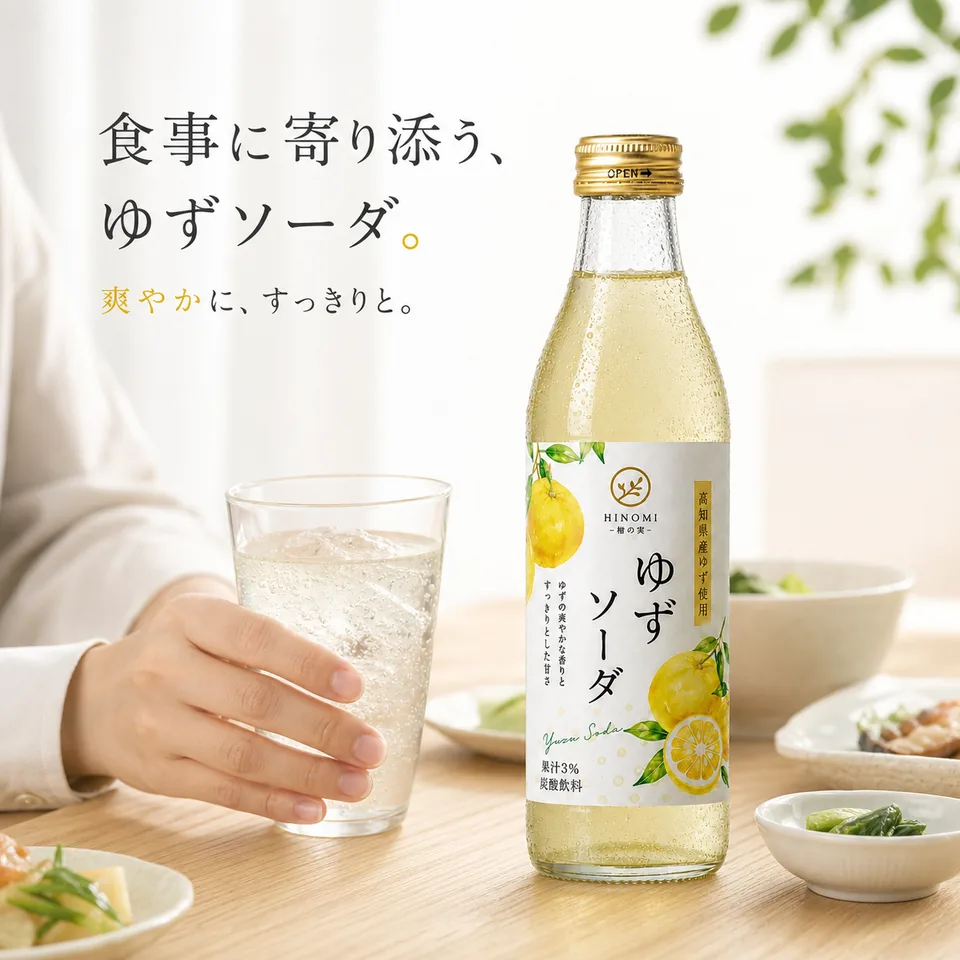
The third image moves from product explanation to use. A hand holding a glass, softly blurred food and the bottle in the scene create an everyday dining context.
Here, the useful detail is the relationship between the person, glass and product. A tightly controlled hand-only composition can show the action without needing a full portrait.
AI planned: the camera angle, hand placement, table setting, background depth and the bottle's position within the scene.
Useful placement: a lifestyle gallery image or a store section about serving occasions.
Review before use: hands should look natural, the grip and scale should be plausible, the bottle should remain recognizable, and the meal should not imply an unsupported product benefit or included item.
Image 4: Bring the packaging details closer
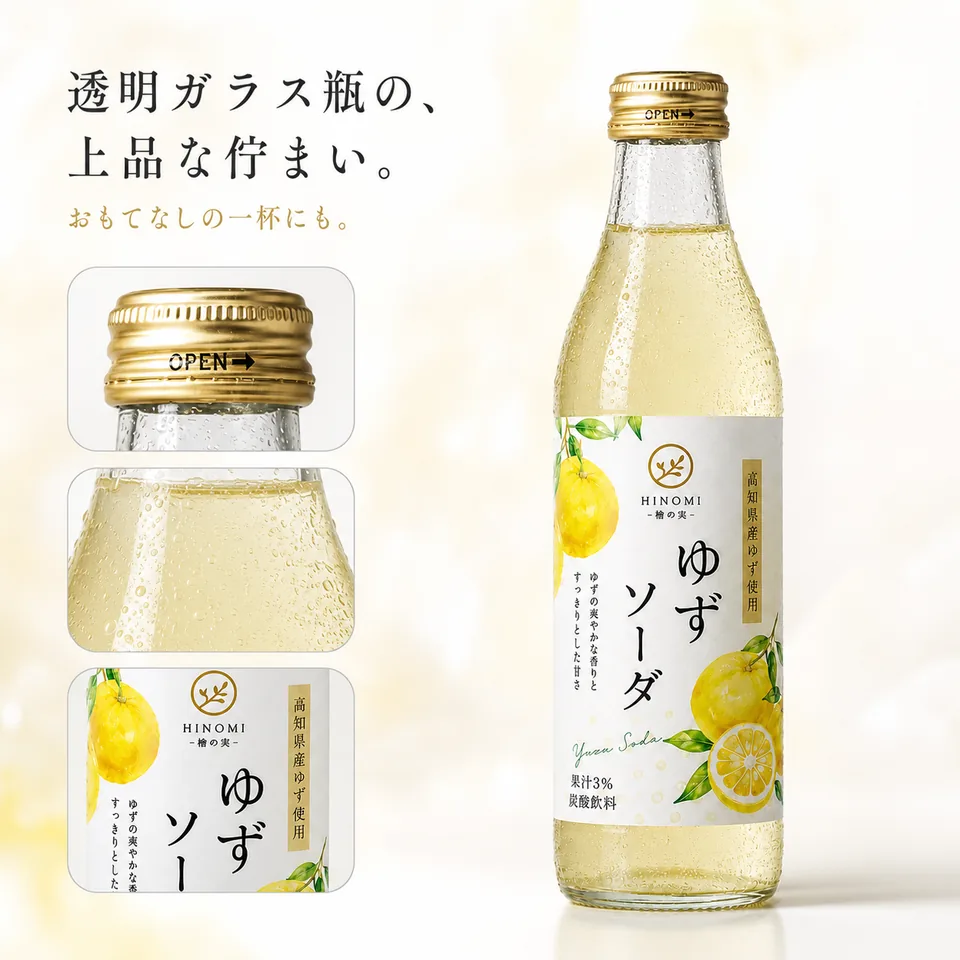
The final image combines a full-bottle view with detail callouts. The cap, bubbles and label get more attention than they would in a small listing thumbnail. Ivory and gold tones keep it visually related to the rest of the set.
AI planned: the balance between the overall bottle and close-up details, the hierarchy of the callouts and the surrounding space.
Useful placement: a product-detail gallery image or a packaging section on the product page.
Review before use: every close-up needs to match the real product. Do not treat an attractive generated detail as evidence of a hidden part, material specification or manufacturing feature that the source photo does not establish.
How we moved from one photo to the finished set
The workflow had five stages:
- Clean the reference in Mireka. Create the white-background bottle image and check it against the source.
- Build the product brief. Give the planning assistant the photo and confirmed information. Separate visible facts from suggestions and unknowns.
- Plan four distinct roles. Ask the assistant to propose an image sequence around this product rather than a generic template.
- Generate complete prompts. Each prompt includes the fixed product appearance, composition, background, light, props, text and exclusions.
- Generate and review individually. Use the same clean reference for each image in Mireka, then inspect the product and copy before proceeding.
For the copyable prompts used to follow this approach, open the five-step product-image tutorial. It includes templates for the reference, brief, image plan and revisions.
The useful division of work is to let AI propose visual solutions while you approve the facts and product identity. You can ask for “a clearer ingredient image” without knowing the technical lighting or composition terms yourself.
What AI handled—and what still needed review
| Task | AI's contribution | Our review |
|---|---|---|
| Product information | Organized visible packaging facts | Confirmed wording and rejected unsupported assumptions |
| Image sequence | Proposed four different buying questions | Checked that the images complemented one another |
| Art direction | Chose backgrounds, props, light and layouts | Checked suitability for the product and market |
| Prompt writing | Produced complete instructions for each image | Checked product-preservation rules and exact copy |
| Image generation | Created the reference and four compositions | Checked shapes, small print, anatomy and visual consistency |
The case demonstrates a production workflow, not measured sales performance. We did not run a conversion-rate or advertising experiment, so the images alone do not establish an increase in sales.
Where these images fit in a store
The four designed images contain text, fruit, glasses or lifestyle scenes. They are primarily candidates for secondary gallery images, product descriptions and promotional materials, depending on the destination's rules. Do not assume that a designed composition is suitable for a marketplace's main-image slot.
Keep a separate product-only image for placements that require it. Check the sales channel and category requirements before upload, and review the final image at the size a mobile shopper will see.
For an English-language store selling this same Japanese product, keep the real Japanese packaging intact. Translate the surrounding marketing copy only when creating a new localized asset, and use approved English wording for the product's claims. The images in this article stay unchanged because they document the original project.
How to adapt the workflow to another product
Keep the process, but rethink the four image roles. A coffee product, desk accessory and skincare bottle will raise different buying questions.
Supply verified capacity, pack count or dimensions if those matter. Add more reference photos if you need a back view or an accurate detail close-up. For a seasonal campaign, change the scene and supporting copy while preserving the product itself.
You can also ask the assistant to revise the plan for a different placement: a product gallery, a wide store banner or a vertical ad. A new layout is often more useful than squeezing the same square composition into every format.
Ready to try your own product? Start with one clear photo in Mireka's AI image generator, create a clean reference and build the set one image at a time.
Frequently asked questions
Can I create product images without design experience?
Yes. Supply a product photo and the facts you know, then review the AI-generated brief and image plan. AI can propose composition, lighting, text placement and complete prompts.
How many images did this case produce?
Five in total: one clean white-background product reference and four ecommerce images covering ingredients and origin, serving, a dining scene and packaging details.
Which model and Mireka feature were used?
GPT-5.6 Sol handled the product brief, image plan and prompts. Image generation used Mireka's Image to Image mode with GPT Image 2, a 1:1 aspect ratio and 1K resolution.
How long did the project take, and how many credits did it use?
The July 29, 2026 case recorded about five minutes from source photo to finished images, five generations and five credits. The recorded effective cost was less than US$0.03. Check the current generation screen for today's credit cost.
Why create a white-background reference first?
It establishes a clean, consistent view of the product for later generations. Reusing the same approved reference helps preserve the bottle, cap, label and proportions across different scenes.
Should every beverage use these same four image types?
No. These roles were chosen for this yuzu soda and the information visible on its label. Ask AI to redesign the sequence around the facts, audience and buying questions for the next product.
Can AI write every image prompt?
Yes. After you approve the brief and image plan, ask for a complete standalone prompt for each image, including the fixed product appearance, composition, background, light, props, text and exclusions.
Can the four designed images be used as marketplace main images?
Do not assume so. They contain text, props and lifestyle scenes, so they are mainly candidates for secondary images, product descriptions or ads. Check the current sales-channel and category rules for each placement.
Do I need to check the generated text?
Yes. Review the wording, characters, numbers, units and line breaks at full size, even when the original prompt used verified packaging information.